Welcome to the KVSC Technology Department

Welcome to the Kankakee Valley School Corporation Technology Department! Our team is committed to providing reliable, innovative technology that supports teaching, learning, and district operations. We work to ensure students and staff have access to the tools, resources, and support they need to succeed in a connected, digital world. From maintaining secure systems to supporting classroom technology and digital learning initiatives, we are dedicated to creating an efficient, safe, and forward-thinking technology environment for our entire school community.

The KVSC Technology Team

Staff Technology Resources

Technology Resources & Information

    Understanding AI and its role in KVSC

    Understanding AI and its role in KVSC Artificial Intelligence (AI) is a rapidly evolving technology characterized by its ability to perform tasks that typically require human intelligence. This includes processing natural language, recognizing patterns, learning from data, and making decisions. In our daily lives, AI manifests in various forms, such as grammar correction tools, website chatbots, personalized music recommendations, and smart home devices. These AI-driven technologies are not just conveniences but have become integral to our routines.

    KVSC AI Guidance

    Scope

    This guidance complements existing policies on technology use, data protection, academic integrity, and student support. For a deeper understanding of AI’s role in KVSC please refer to this document.


    Philosophy

    KVSC is committed to:

    • leveraging Artificial Intelligence (AI) to enhance education and prepare students for an AI-driven future.
    • emphasizing responsible and ethical use of AI by staff and students, in alignment with the district's values and educational objectives.
    • supporting academic success while promoting critical thinking, creativity, and digital literacy through AI integration.
    • empowering students and staff to effectively utilize AI, enhancing rather than substituting the human aspects of learning.
    • adapting to the changing AI landscape to maintain relevant, secure, and advantageous practices for the entire educational community.

    Guiding Principles

    These principles are designed to safely and effectively integrate AI into our education system and support our existing goals, academic integrity, and security standards.

    1. Enhancing Educational Goals and Accessibility: We employ AI to advance student learning, teacher effectiveness, and operational efficiency. Our focus includes making AI accessible to all.

    2. Alignment with Policies and Regulations: AI use in our district will strictly adhere to existing regulations concerning student privacy, accessibility, and content safety. Any use of AI must adhere to existing board policies, responsible use policy and the student/parent handbook.

    Additionally, staff are expected to comply with the faculty/staff handbook and should adhere to federal and state regulations, including the Children’s Internet Protection Act (CIPA), the Children’s Online Privacy Protection Act (COPPA), and the Family Educational Rights and Privacy Act (FERPA) to protect students’ personally identifiable information (PII).

    3. Maintaining Academic Integrity: AI is a support tool and its use should align with our district's mission and core values. Students are required to honor these values by appropriately acknowledging AI assistance in their work. Any misuse of AI will be subject to our established plagiarism and cheating policies.

    4. AI Literacy and Education: Essential to our approach is educating students and staff about AI. This includes understanding its usage, operational principles, and its integration into various subjects.

    5. Continuous Monitoring and Evaluation: Recognizing the rapid evolution of AI, we commit to regular audits and updates of our AI usage policies and practices, ensuring they remain relevant and practical.


    Responsible Use of AI Tools

    In the evolving educational landscape, AI tools offer diverse applications across classroom activities and assignments. Similar to the use of the Internet or a calculator, AI is permitted to assist in student learning. Teachers have discretion to determine when and how to integrate these tools into their lessons. As technology progresses, it's crucial to instruct students on responsible AI usage, focusing on its ethical and effective use.


    Unacceptable Use of AI Tools

    While we are embracing AI's potential to enhance educational experiences, it is equally important to acknowledge and mitigate its risks. To guide appropriate usage, examples of prohibited uses of AI tools can be accessed here.


    Special Consideration: Advancing Academic Integrity

    The use of AI tools is permitted; however, using AI-generated content without proper disclosure is considered plagiarism. Students must cite AI assistance or acknowledge AI use as instructed by the teacher.


    Special Consideration: Security, Privacy, and Safety

    All AI systems deployed within the school must be evaluated for compliance with relevant laws and regulations, including data protection, personally identifiable information (PII), privacy, and students’ online safety. Staff and students are prohibited from entering confidential or PII into unauthorized AI tools, such as those without approved data privacy agreements.


    References

    • Code.org. (2023). Retrieved December 5, 2023
    • TeachAI.org. (2023). Retrieved December 5, 2023
    • Digital Promise. (2023). Retrieved December 5, 2023
    • OpenAI. (2023). ChatGPT (Version 4.0) [AI language model]. Retrieved December 5, 2023.
    • Policy Analysis for California Education (PACE). (2023). Retrieved December 5, 2023

    Rubric for Evaluating AI tools in Education
    Prohibited Use of AI Tools

    As we work to realize the benefits of AI in education, we also recognize that risks must be addressed. Below are some examples of prohibited uses of AI tools. It's important to understand that this list is not all-encompassing, and there may be other potential misuses that are not listed but are equally significant and should be avoided.


    Student Learning

    • Bullying/harassment: Using AI tools for bullying, harassment, or any form of intimidation is strictly prohibited. This aligns with our existing bullying and harassment policies, which will be enforced as necessary.
    • Overreliance: Relying too much on AI can lead to missing crucial nuances and context. Teachers will clarify if, when, and how AI tools should be used in their classrooms, and teachers and students are expected to review outputs generated by AI before incorporating them into their work.
    • Plagiarism and cheating: Students and staff should not copy from any source, including generative AI, without adequate citation. Students should not submit AI-generated work as their original work. Existing procedures related to potential violations of our academic policies will be applied to AI-generated content.

    Teacher Support

    • Societal Bias: AI tools trained on human data will inherently reflect societal biases in the data. Risks include reinforcing stereotypes, recommending inappropriate educational interventions, or making discriminatory evaluations, such as falsely reporting plagiarism by non-native English speakers.
    • Diminishing student and teacher agency and accountability: While generative AI presents useful assistance to amplify teachers' capabilities and reduce teacher workload, these technologies will not be used to supplant the role of human educators in instructing and nurturing students. The core practices of teaching, mentoring, assessing, and inspiring learners will remain the teacher's responsibility in the classroom.

    School Management and Operations

    • Compromising Privacy: The education system will not use AI in ways that compromise teacher or student privacy or lead to unauthorized data collection.
    • Noncompliance with Existing Policies: We will evaluate AI tools for compliance with all relevant policies and regulations. AI tools will be required to detail if/how personal information is used to ensure that personal data remains confidential and isn't misused.
    Chromebooks Care

    General Care

    • Do NOT have any food or drinks near the Chromebook.
    • Cord must be inserted CAREFULLY into the Chromebook.
    • Chromebooks do NOT like when you touch their screen. In fact, they might react negatively by blurring or cracking themselves if you touch their screen too hard with any object. This includes your finger, a pencil or any other item.
    • Do NOT place your Chromebook on uneven surfaces where they might accidentally fall.
    • Avoid placing heavy objects on the top of the Chromebook.
    • Chromebooks do NOT like excessive heat or cold.
    • Damage, loss, or theft must be reported immediately. All Chromebook repairs must be made through our technology department.
    • DO NOT remove the protective case for any reason, you will be billed for any damages that result.

    Carrying Chromebooks

    • Transport Chromebooks with care.
    • Chromebook lids should always be closed when moving. Do NOT carry your Chromebook while the screen is open.
    • NEVER move a Chromebook by lifting from the screen. Always support a Chromebook from its bottom with the lid closed.

    Charging Your Chromebook

    • The Chromebook holds a charge for between 6-8 hours
    • Make sure to plug your Chromebook in each night (when at home) so that it is fully charged for the morning. Leave your charger at home.
    • Our building tech Mrs. Doffin shows us how to wrap a charger.

    Keeping Your Chromebook Clean

    • Do NOT spray your Chromebook with any windex/household cleaner/water.
    • Clean the outside/keys and screen with a LIGHTLY moistened Clorox wipe (do NOT use a saturated one) - use a dry soft cloth to dry off Chromebook.

    Knowledge Base

    There are many helpful articles in the knowledge base on the helpdesk. Click HERE to view!

    Schoology

    What is Schoology?

    A centralized hub for personalized teaching and learning that connects teachers, students, and families in a single platform. It connect students, families, teachers, and the community to learning across your entire district. More than just assignments and messaging and calendars, Schoology Learning is a one-stop-platform for educators to personalize your district’s curriculum to the needs of each student.

    Parent Sign Up Guide:

    Welcome Parents - https://youtu.be/_RIZNKJFb-8

    1. Go to www.schoology.com.
    2. Click Sign Up at the top of the page and choose Parent.
    3. Enter your Parent Access Code. This is a 12-digit code in xxxx-xxxx-xxxx format. You can find your child’s code in Skyward Family Access under “Online Forms”.
    4. Fill out the form with your information.
    5. Click Register to complete. When you use a Parent Access Code to create an account, you are automatically associated with your child. You can add additional children to your account using the Add Child option.

    Notes: If your Parent Access Code does not allow you to register or, if the code does not have 12 digits, please contact the KV IT Department 219-987-8817 for more information.

    Parent View vs. Student View

    Communication

    Using the iOS App

    Loaners

    *Students must bring their device to school every day and make sure it is fully charged.

    *Device Spare Equipment and Lending - If a student’s 1:1 device is inoperable, the school has a limited number of spare devices for use while the student’s device is repaired or replaced. There is no guarantee a loaner will be available for devices that the student neglected to charge or left at home. Charging the device is part of being properly prepared for school.

More Technology Resources

Name
Chromebooks - Getting Started, Tips, and Troubleshooting Guide
Technology Responsible Use Policy.pdf
Loading...

If contents fail to load, please reload page.

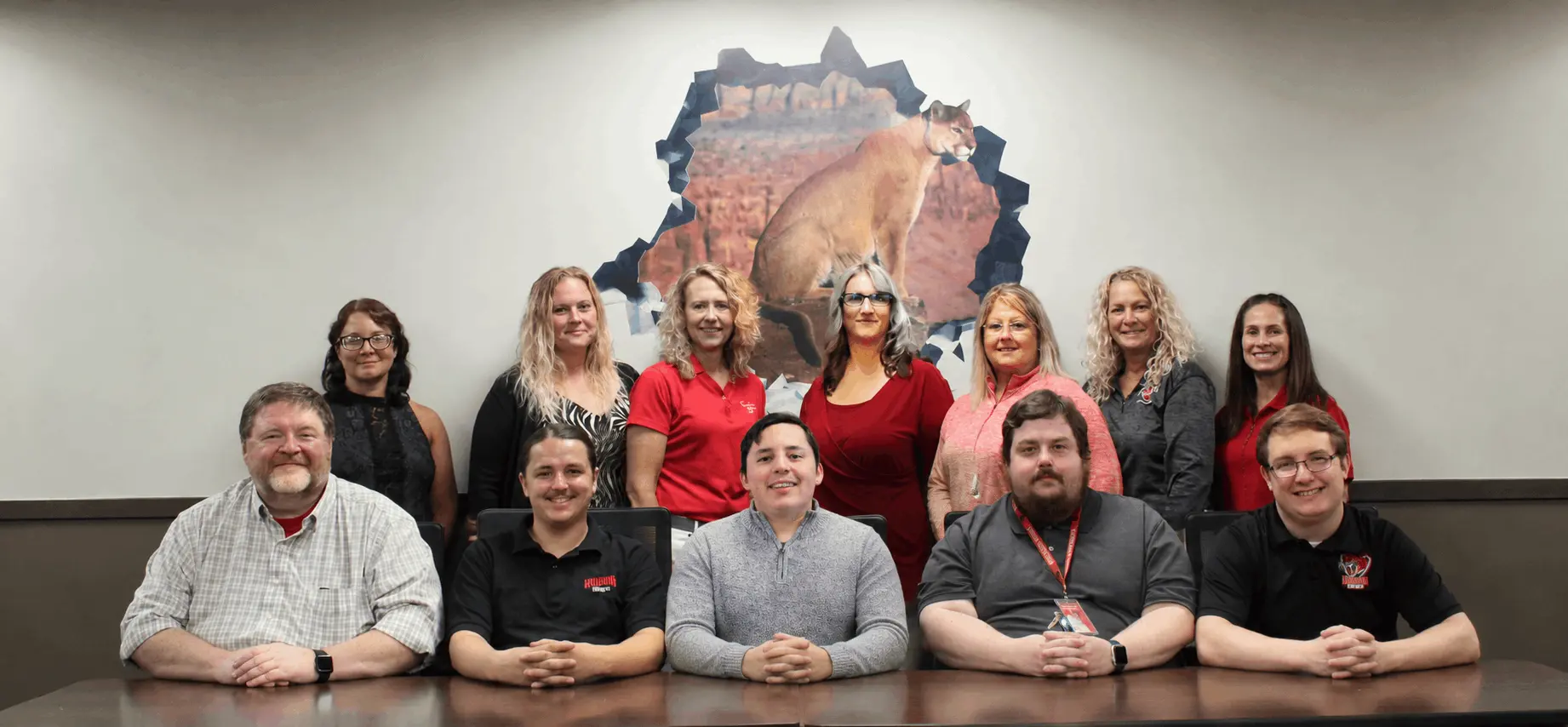
Meet our TEAM!


Bottom row left to right:

Eric Roemer-Chief Technical Officer, Noah Mihalovits-Computer Technician (KVHS), Aaron Lugo-Computer Technician (KVMS), Jacob Kieszkowski- Network Engineer, and Nathan Stall- Lead Technology Support Technician (KVHS).

Top row left to right:

Leann Doffin-Building Technician (KVMS & DES), Nicole Blondeel-Building Technician (DES), Shannon Scheurich- Data Specialist, Krista O'Brien- Secretary, Tammi Helton-Building Technician (KVIS), Shelly Kamminga-Building Technician (WES), and Omi Suiter-SIS Manager.

IT Staff photo